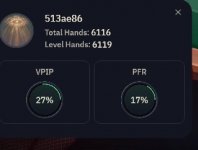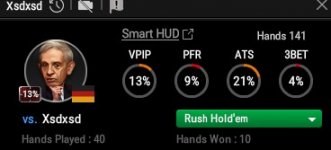




Now that we’ve covered what HUDs are, which HUDs are available, and you’ve taken the plunge into purchasing one, the next question is:
How do you actually use a HUD properly—both on and off the felt—and what should you avoid?
It’s time to unpack the key features of HUDs, how to use them effectively, and—just as importantly—how not to use them. The goal isn’t just better information, but better decisions and more profit.
To effectively use a HUD while playing, we need to break this into two distinct scenarios, each with a different goal:
This is where note-taking becomes critical.
A good HUD will log hands that fall outside expected ranges. For example, that yellow note icon next to the player’s name? Hovering over it reveals hands where they’ve done something unexpected—but this must be corroborated with your own notes.
Every hand that goes to showdown—and yes, every single one—either validates or challenges the HUD’s stats.
If a player shows a 20% VPIP but repeatedly raises unsuited aces, ask yourself:
A 57% VPIP over 1,400 hands tells a very clear story:
🔑 One critical reminder:
If you have data on them, they likely have data on you.
Most HUDs display your own stats in real time. You can use this to:
This becomes important in the next section.
💡 When reviewing hands:
By compiling hand histories into reports and graphs, you can identify leaks and trends in your game. While examples here use PokerTracker 4, all major databases offer similar tools.
Expect:
It:
They are not solvers, and they only display historical data. Despite controversy in some online rooms, HUDs remain an essential tool where permitted.
Failing to use them properly—or not using them at all—is leaving money on the table.
📌 Find all CardsChat poker learning series here: CardsChat Learning Poker Thread Series Guide

How do you actually use a HUD properly—both on and off the felt—and what should you avoid?
It’s time to unpack the key features of HUDs, how to use them effectively, and—just as importantly—how not to use them. The goal isn’t just better information, but better decisions and more profit.
⚠️ Disclaimer
While we are not promoting one HUD over another, you will see more references to PokerTracker 4, as this is the HUD I personally use. Other poker software will be referenced where relevant. CardsChat does not promote one HUD or poker database over another, nor should this article be considered advertising for PokerTracker 4.🔍 What We’ll Cover
- Properly using HUDs while playing
- Properly using HUDs off the felt
- Using poker databases off the felt
- Common mistakes to avoid when using a HUD
💥 Properly Using HUDs While Playing
To illustrate how to best use a HUD in real time, let’s look at a hand recently posted in a cash game thread on the forum, using PokerTracker 4 as the backdrop.Note: This is how my HUD is set up. Your HUD should be customized to how you process and interpret information in real time.
To effectively use a HUD while playing, we need to break this into two distinct scenarios, each with a different goal:
🟡 When You Don’t Have Sufficient History on an Opponent
Let’s say we only have 14 hands on a cutoff player. Even with a small sample, we can still observe:- They’re playing any unsuited ace, reflected in a 57% VPIP
- Their raise range doesn’t align with a standard 29% opening range
What hands are they actually playing versus what their stats suggest?
This is where note-taking becomes critical.
A good HUD will log hands that fall outside expected ranges. For example, that yellow note icon next to the player’s name? Hovering over it reveals hands where they’ve done something unexpected—but this must be corroborated with your own notes.
Every hand that goes to showdown—and yes, every single one—either validates or challenges the HUD’s stats.
- When players act within expected ranges, your confidence in the data increases
- When they don’t, your HUD should help flag that deviation
If a player shows a 20% VPIP but repeatedly raises unsuited aces, ask yourself:
- What should be in that 20% range?
- What hands are they not playing (e.g., suited connectors, small pairs)?
- Hands shown at showdown
- Table position
- Whether they raised preflop
🟢 When You Do Have Sufficient History
This is where a HUD truly shines. Now imagine the same player—but with 1,400 hands instead of 14.A 57% VPIP over 1,400 hands tells a very clear story:
- Any suited cards (except maybe low deuces)
- Any paint
- Any pair
- Any ace
- Any two cards seven or higher
🔑 One critical reminder:
If you have data on them, they likely have data on you.
Most HUDs display your own stats in real time. You can use this to:
- See whether you’re playing within your usual ranges
- Occasionally exploit situations by playing outside your stats
📝 Flagging Hands for Review
Many HUDs allow you to flag hands during play. This is extremely useful—but only if used correctly. Flag hands when:- You’re unsure about your decision
- An opponent played in an unusual or unexpected way
This becomes important in the next section.
💥 Properly Using HUDs Off the Felt
Using a HUD doesn’t stop when you leave the table. The two biggest off-the-felt uses are:- Reviewing hands
- Analyzing your own stats
- VPIP = 33%
💡 When reviewing hands:
- Focus on session stats, not lifetime stats
- Session stats are what your opponents are most likely seeing
- See if your hand selection matches your VPIP
- Compare what opponents are actually playing versus what their stats suggest
- Identify hands that don’t align with expected ranges
💥 Properly Using Databases Off the Felt
The real power of poker software lies in its analytics.By compiling hand histories into reports and graphs, you can identify leaks and trends in your game. While examples here use PokerTracker 4, all major databases offer similar tools.
📊 VPIP by Hand
This chart shows how often you’ve played each starting hand. It can reveal:- Hands you may be overplaying without realizing it
- Biases in your hand selection
- Pocket 3s played more often than AK suited
- Pocket kings played more than pocket aces
- Unsuitable aces below A7
- Fringe hands like J5 offsuit or 85 suited
📍 Winnings by Position
This report shows where you’re winning and losing money.Expect:
- Strong positive results on the button and cutoff
- Negative results in the blinds
- Losing at showdown from the button
- Could indicate opening too wide or poor postflop decisions
🛠️ LeakTracker
Most major HUDs include a leak detection tool.It:
- Breaks your stats down by position
- Quickly highlights areas needing improvement
- Helps focus your study time on specific situations
💥 Things to Avoid When Using a HUD
HUDs are powerful—but only if used correctly. Avoid these common mistakes:- Becoming robotic
Poker is half art, half science. A HUD doesn’t replace intuition or psychology. - Ignoring table dynamics
HUDs don’t account for ICM, stack pressure, or shifting tournament dynamics. - Overvaluing small samples
Until you have hundreds of hands, stats are suggestions—not truth. - Replacing note-taking
HUDs supplement notes; they do not replace awareness and observation.
🎯 Summary
HUDs are game-changers when used correctly—particularly when you have sufficient data to build opponent-specific ranges and adjust based on past behavior.They are not solvers, and they only display historical data. Despite controversy in some online rooms, HUDs remain an essential tool where permitted.
Failing to use them properly—or not using them at all—is leaving money on the table.
💬 How Do You Use Your HUD?
Share your tips, best practices, and insights. Let’s learn from each other and push our games forward—together.🔔 Subscribe to the CardsChat Learning Series
So you never miss the next drop. Turn on notifications and keep sharpening your edge—one position at a time.📌 Find all CardsChat poker learning series here: CardsChat Learning Poker Thread Series Guide