
CRStals
Moderator
Moderator






- Joined
- Jan 14, 2016
- Total posts
- 11,720
- Awards
- 19
- Poker Chips
- 1,688
- Casino Coins
- 241
- #1
Every poker player is constantly searching for an edge over their competition, and one of the most powerful tools available online is the Heads-Up Display (HUD). A well-set-up HUD can help you make better decisions by analyzing the betting patterns of your opponents. But not all HUDs are created equal. In this series, we’ll dive deep into how to properly use a HUD to gain an edge at the table!
Key points:
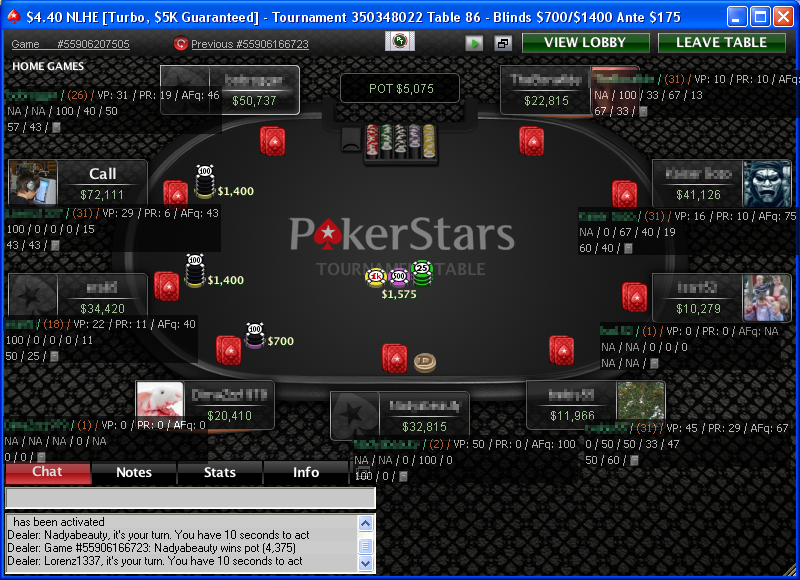
Looking at a HUD for the first time can be overwhelming, but you can customize it to show only the data you need. Display just a few key stats or opt for a full analysis of your opponent’s playstyle.
Must-Have Stats to Track:


By tracking these numbers, you can adjust your play and start making more informed decisions based on your opponent’s tendencies.
🔔 Subscribe to the CardsChat Learning Series
So you never miss the next drop! Turn on notifications and keep sharpening your edge — one position at a time.
You can find all our poker learning series right here: CardsChat Learning Poker Thread Series Guide

🔍 What We’ll Cover:
- Breaking Down a HUD
- Do’s and Don’ts of Setting Up a HUD
- How to Use a HUD While Playing
- How to Optimize a HUD for You
💥 Breaking Down a HUD
A Heads-Up Display (HUD) is a tool that online poker players use to track the betting patterns of their opponents. This data helps you make more informed decisions during your hand. Unlike solvers that analyze current hands, HUDs rely on historical data to give you insights into how your opponents have played in the past.Key points:
- HUDs are legal on most online poker sites, but some platforms have specific rules about using them. Be sure to check the terms and conditions of your poker room.
- To use a HUD, you typically need software like PokerTracker 4, which collects hand data and generates statistics based on past hands.
Looking at a HUD for the first time can be overwhelming, but you can customize it to show only the data you need. Display just a few key stats or opt for a full analysis of your opponent’s playstyle.
Must-Have Stats to Track:
- Hands: The number of hands logged against an opponent. The more hands, the more reliable the data.
- VPIP (Voluntarily Put Into Pot): The percentage of hands your opponent plays by putting money into the pot voluntarily. This gives you an idea of their range.
- PFR (Pre-Flop Raise): How often your opponent raises before the flop. Combined with VPIP, this shows how aggressive or passive they are pre-flop.
- 3B (Three-Betting Frequency): How often your opponent three-bets pre-flop. A high 3B means they’re likely playing aggressively.
- ATS (Attempt to Steal): How often they raise to steal the blinds from a late position.
- CBET (C-bet on Flop): The percentage of times your opponent continuation-bets after raising pre-flop.
- WTSD (Went to Showdown): How often your opponent reaches the showdown. This indicates whether they are passive or aggressive post-flop.
- FT3B (Folds to 3-Bet): How often they fold to a 3-bet. A high stat means they are less likely to defend their raises.
💥 Do's and Don'ts of Setting Up Your HUD
Setting up your HUD properly is essential for effective use. Here are the Do’s to keep in mind:- Ensure proper alignment: Test your HUD to ensure it fits well with your poker room's layout. The graphics should not interfere with your view of the table or opponent info.
- Understand each stat: Before using your HUD, make sure you know what each stat means and how to interpret it.
- Practice with your HUD: Spend time on play-money tables or the lowest stakes games to get familiar with your HUD setup.
- Don’t place your HUD too far from the table: It should be close to each player’s stats without obstructing critical table information like community cards or stacks.
- Avoid too many stats: Display only the most relevant stats to avoid overwhelming yourself with data.
- Don’t show stats you don’t understand: Only display the stats you’re comfortable interpreting. Unfamiliar data can lead to confusion.
- Don’t skip testing: Before jumping into a real game, test your HUD in low-stakes games to avoid making mistakes.
- Don’t use default settings: Customize your HUD to match your style of play. Default settings often don’t align with how you approach the game.
💥 How to Best Use a HUD While Playing
One of the biggest mistakes players make with a HUD is trusting the data at face value. Early in a session, your HUD might not have enough data to be reliable. Here’s a basic rule of thumb:- Under 20 hands: The data is too sparse to be useful.
- 50 hands: Now you can start to get a feel for their playstyle, but still be cautious.
- 300+ hands: You can start relying on stats like 3-betting frequency and post-flop tendencies.
- 1000+ hands: Post-flop stats become more reliable.
- 5000-8000 hands: This is where you can fully trust stats like Went to Showdown (WTSD).
- Any suited Ace, pocket pairs (except deuces), K8s+, Q9s+, J9s+, A8o+, KJo+, and some suited connectors.
By tracking these numbers, you can adjust your play and start making more informed decisions based on your opponent’s tendencies.
💥 How to Optimize a HUD for You
Optimizing your HUD is all about personal preference. You need to decide which stats are most important to you and arrange them in a way that makes them easy to access during play. Here are some tips:- Choose key stats: Decide whether you want to track aggression factors, pre-flop stats, or post-flop tendencies.
- Test the HUD setup: Make sure it works in a full-table game and doesn’t block important information.
- Multi-table with your HUD: Make sure you can process information quickly when you’re playing multiple tables.
- Test the data: Verify that the stats align with the player’s tendencies. You don’t want to rely on incorrect data!
🎯 Summary
HUDs are one of the most powerful tools available to online poker players. They give you a significant edge by allowing you to analyze opponent behavior in real-time. Just be sure to use a HUD that’s legal on your chosen site and customize it to fit your playstyle.💬 How Do You Use a HUD?
We’d love to hear from you! How do you set up and use your HUD in online poker? Share your tips and tricks in the comments below, and join the conversation.🔔 Subscribe to the CardsChat Learning Series
So you never miss the next drop! Turn on notifications and keep sharpening your edge — one position at a time.
You can find all our poker learning series right here: CardsChat Learning Poker Thread Series Guide