Pokerstars Aurora graphics freeze !

D

dachi

Rising Star
Bronze Level
Joined
Sep 25, 2021
Total posts
4
Poker Chips
0
Casino Coins
0
  • #1
Hey guys , Pokerstars updated the soft 2 days ago and the players aren't able to
switch back to the old design via backup files trick. Now we are forced to play on aurora
graphics. I would've get used to it , if not one big, fatal problem. Everytime when i open
a tournament table , the soft freezes. I have a strong pc though. Am I the only one who has
such kind of problem? Or if not , do you have a solution for that.:)
 
Zapahlohotrona

Zapahlohotrona

Visionary
Silver Level
Joined
May 4, 2021
Total posts
562
Poker Chips
0
Casino Coins
0
  • #2
I still play with the old engine, I have no idea how I will play with the Aurora on my old computer.
 
  • Like
Reactions: ADRI7HO
akmost

akmost

Rising Star
Loyaler
Joined
Feb 2, 2017
Total posts
2,060
Awards
2
GR
Poker Chips
689
Casino Coins
0
  • #3
I used to use the LegacyPokerTable=1 trick but I updated the software and I am not able to use this trick anymore. The positive thing is that PS made the new engine lighter and I can play several tables without lagging. When they first released the new engine I had terrible lag issues in one single table. I play on a laptop , not very strong and I have no problem though.(i5 5200U , 8GB ram with internal GPU).

I don't know what's wrong with your client since you are telling that your PC is strong. Maybe you should lower the graphics etc???

I liked the older engine much more , it was so smooth , I wish they could give the option to choose between the two at some point again.
 
  • Like
Reactions: Poker Orifice and EvertonGirl
Ron112355

Ron112355

Legend
Loyaler
Joined
Oct 27, 2020
Total posts
2,825
Awards
31
CA
Poker Chips
1,072
Casino Coins
0
  • #4
dachi said:
Hey guys , Pokerstars updated the soft 2 days ago and the players aren't able to
switch back to the old design via backup files trick. Now we are forced to play on aurora
graphics. I would've get used to it , if not one big, fatal problem. Everytime when i open
a tournament table , the soft freezes. I have a strong pc though. Am I the only one who has
such kind of problem? Or if not , do you have a solution for that.:)


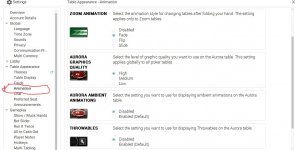
In settings go to Table Appearance, drop down menus click on animation to disable Aurora Graphics
Capture
 
  • Like
Reactions: ADRI7HO, DS3 and papapokera85
papapokera85

papapokera85

Legend
Bronze Level
Joined
Dec 4, 2018
Total posts
1,027
Awards
8
RU
Poker Chips
40
Casino Coins
0
  • #5
Good information !!!
 
najisami

najisami

Legend
Loyaler
Joined
Aug 11, 2014
Total posts
8,946
Awards
17
MA
Poker Chips
4,177
Casino Coins
360
  • #6
dachi said:
Hey guys , Pokerstars updated the soft 2 days ago and the players aren't able to
switch back to the old design via backup files trick. Now we are forced to play on aurora
graphics. I would've get used to it , if not one big, fatal problem. Everytime when i open
a tournament table , the soft freezes. I have a strong pc though. Am I the only one who has
such kind of problem? Or if not , do you have a solution for that.:)

It's been already a while that people are complaining about that Aurora and PS responsible staff is ignoring the issue.
Thankfully, they let you disable or minimize some of Aurora fonctions in Settings --> Animations. But the problem is that the settings go back to default every time they update the software and you'd have to do it again.
 
D

dachi

Rising Star
Bronze Level
Joined
Sep 25, 2021
Total posts
4
Poker Chips
0
Casino Coins
0
  • #7
Pokerstars Aurora graphics table freeze solved !!

Hello again guys. I have a great news for those who have table freezing problem
with pokerstars aurora graphics. Today I found the solution. If you are experiencing
such kind of problem , apparently you have an amd graphics card - catalyst. The thing
is that old Amd graphics card (Radeon HD 5xxx , 6xxx , 7xxx , 8xxx ) have to types of drivers: Catalyst and Crimson. Aurora graphics don't get on well with catalyst , that's why the soft crashes after several moves after logging in the lobby. During installation ,Windows 7/8/10 automatically installs Catalyst drivers. All you have to do is to find out which model of Amd Radeon you have, delete Catalyst driver and install Crimson. This worked for me. Hope the post will be helpful for you , since returning to old pokerstars is impossible
 
  • Like
Reactions: Rafael_rg84 and Vallet
DaveE

DaveE

Solvem probler
Loyaler
Joined
Mar 8, 2007
Total posts
15,064
Awards
31
CA
Poker Chips
1,749
Casino Coins
0
  • #8
I had to buy a new (well used, but new to me:)) laptop to be able to play there without worries.
 
acidburnfx

acidburnfx

🧃Senior apprentice
Loyaler
Joined
May 18, 2013
Total posts
7,272
Awards
16
BR
Poker Chips
2,367
Casino Coins
60
  • #9
akmost said:
I used to use the LegacyPokerTable=1 trick but I updated the software and I am not able to use this trick anymore. The positive thing is that PS made the new engine lighter and I can play several tables without lagging. When they first released the new engine I had terrible lag issues in one single table. I play on a laptop , not very strong and I have no problem though.(i5 5200U , 8GB ram with internal GPU).

I don't know what's wrong with your client since you are telling that your PC is strong. Maybe you should lower the graphics etc???

I liked the older engine much more , it was so smooth , I wish they could give the option to choose between the two at some point again.

I'm with the this same problem! I was also using this method and liked the previous version. I think they should have more consideration and maybe offer a "light version" to attend to all users.
 
  • Like
Reactions: akmost
akmost

akmost

Rising Star
Loyaler
Joined
Feb 2, 2017
Total posts
2,060
Awards
2
GR
Poker Chips
689
Casino Coins
0
  • #10
acidburnfx said:
I'm with the this same problem! I was also using this method and liked the previous version. I think they should have more consideration and maybe offer a "light version" to attend to all users.


Yes I totally agree with you , wish they will do it.
The main problem though is not for the people who play only on PS - I mean only on one poker site- Ok the new graphics engine has become lighter compared to the very beginning. The real ''problem'' is for those who play simultaneously on many sites. For example GG and ACR are super CPU consuming. Guys we just want to play some cards we are not gamers , we don't want 4K graphics and eye catching visuals :D
 
Poker Orifice

Poker Orifice

And Still...
Platinum Level
Joined
Jan 19, 2008
Total posts
28,289
Awards
6
CA
Poker Chips
892
Casino Coins
5
  • #11
Ron112355 said:
In settings go to Table Appearance, drop down menus click on animation to disable Aurora Graphics
View attachment 295132


This ^ doesn't disable the Aurora Graphics.
 
MishkaZL

MishkaZL

Legend
Loyaler
Joined
Dec 1, 2018
Total posts
2,826
Awards
5
UA
Poker Chips
575
Casino Coins
205
  • #12
I just disabled this feature in the settings. It seems to me that this update is of no real use.
 
Sunz of Beaches

Sunz of Beaches

Sunz Tzu
Platinum Level
Joined
Oct 26, 2019
Total posts
6,041
Awards
2
Poker Chips
2,443
Casino Coins
240
  • #13
I play on a very low level laptop and i have everything disabled plus aurora graphics on low. Works fine for me, not a lot of issues when playing up to 4 tables.

Try to use carbon light theme :)
 
antonis32123

antonis32123

Legend
Loyaler
Joined
Dec 25, 2014
Total posts
7,382
Awards
20
GR
Poker Chips
623
Casino Coins
100
  • #14
I disabled Aurora graphics , no need of them fore , my old laptop was not strong enough to play with these graphics , many times it got slower and slower .
 
V

valeski 28

Legend
Loyaler
Joined
Sep 22, 2014
Total posts
3,235
Awards
2
Poker Chips
1,114
Casino Coins
0
  • #15
Good afternoon.Well , with the new laptop I bought some months ago, I don´t have the problems I had with the old one.but I try not to play in several sites at once.It is impossible on weekends,though.But , as many members say, it would be better with old version.
 
  • Like
Reactions: ADRI7HO
Sunz of Beaches

Sunz of Beaches

Sunz Tzu
Platinum Level
Joined
Oct 26, 2019
Total posts
6,041
Awards
2
Poker Chips
2,443
Casino Coins
240
  • #16
antonis32123 said:
I disabled Aurora graphics , no need of them fore , my old laptop was not strong enough to play with these graphics , many times it got slower and slower .
You can not disable them. Aurora is now mandatory
 
ADRI7HO

ADRI7HO

On the road...
Bronze Level
Joined
May 6, 2020
Total posts
7,296
Awards
9
Poker Chips
509
Casino Coins
0
  • #17
I liked the old version better too. It’s with this version of Aurora that the table freezes for me too, and sometimes it stumbles.
So not very good.
 
R

Rafael_rg84

Rising Star
Bronze Level
Joined
Jan 13, 2019
Total posts
1
Poker Chips
0
Casino Coins
0
  • #18
Works for me! Thanks.

dachi said:
Hello again guys. I have a great news for those who have table freezing problem
with pokerstars aurora graphics. Today I found the solution. If you are experiencing
such kind of problem , apparently you have an amd graphics card - catalyst. The thing
is that old Amd graphics card (Radeon HD 5xxx , 6xxx , 7xxx , 8xxx ) have to types of drivers: Catalyst and Crimson. Aurora graphics don't get on well with catalyst , that's why the soft crashes after several moves after logging in the lobby. During installation ,Windows 7/8/10 automatically installs Catalyst drivers. All you have to do is to find out which model of Amd Radeon you have, delete Catalyst driver and install Crimson. This worked for me. Hope the post will be helpful for you , since returning to old pokerstars is impossible


Works to me!!
 
acidburnfx

acidburnfx

🧃Senior apprentice
Loyaler
Joined
May 18, 2013
Total posts
7,272
Awards
16
BR
Poker Chips
2,367
Casino Coins
60
  • #19
nairolph87 said:
You can not disable them. Aurora is now mandatory

You're right! I received this message today: "Aurora is now our default graphics engine, the old desktop technology has been disabled and unfortunately it is not possible to disable it."
 
Sunz of Beaches

Sunz of Beaches

Sunz Tzu
Platinum Level
Joined
Oct 26, 2019
Total posts
6,041
Awards
2
Poker Chips
2,443
Casino Coins
240
  • #20
acidburnfx said:
You're right! I received this message today: "Aurora is now our default graphics engine, the old desktop technology has been disabled and unfortunately it is not possible to disable it."
Hello my friend. I think they sent out messages like that long ago when it still was possible to go back to the old engine. However im pretty sure now its no more possible.

Sucks since its a very bad change
 
C

cheeeer

Visionary
Bronze Level
Joined
Apr 18, 2017
Total posts
984
Awards
6
Poker Chips
84
Casino Coins
0
  • #21
Lucky you. I can't log in because they ask PIN which is sent to blocked e-mail. Does anyone remember e-mail of Pokerstars?
 
acidburnfx

acidburnfx

🧃Senior apprentice
Loyaler
Joined
May 18, 2013
Total posts
7,272
Awards
16
BR
Poker Chips
2,367
Casino Coins
60
  • #22
cheeeer said:
Lucky you. I can't log in because they ask PIN which is sent to blocked e-mail. Does anyone remember e-mail of Pokerstars?

I advise you to send it through the website contact: https://www.pokerstars.eu/help/ instead of directly by email: [email protected]

Choose any article and then go to:
- Feedback: "Did this article answer your question?" and click "No"
And go straight to the support area.
 
C

cheeeer

Visionary
Bronze Level
Joined
Apr 18, 2017
Total posts
984
Awards
6
Poker Chips
84
Casino Coins
0
  • #23
acidburnfx said:
I advise you to send it through the website contact: https://www.pokerstars.eu/help/ instead of directly by email: [email protected]

Choose any article and then go to:
- Feedback: "Did this article answer your question?" and click "No"
And go straight to the support area.
Thank's! I guess it will be faster than through email.
 
PokerStars Reviews: Français, Nederlands, Deutsch, Dansk, Italiano, Español, Polski, Norsk, Português, Svenska - PokerStars Mobile - Deutsch Mobile - PS Casino
Top