PokerStars: Hungarians are not allowed for real money?!?

lacroir

lacroir

Rock Star
Bronze Level
Joined
Jan 3, 2023
Total posts
232
Awards
2
HU
Poker Chips
160
Casino Coins
0
  • #1
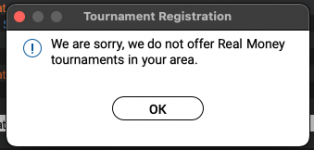
After yesterday's German topic on not allowing to play on real money, I get the following error now in Hungary as well:
Screenshot 2023 05 18 at 141033
In the morning it was fine, I could play and I'm still registered in my SCOOP Phase 2 Tournament...
Anyone has an idea what's going on? Anyone else from Hungary face the same?

I can't even play these Freebuys, just checked - even though they have no buy-in.
 
  • Wow
  • Like
Reactions: dallam, ADRI7HO and Andyreas
G0930

G0930

Captain Fathermucker, Satty Aficionado
Loyaler
Joined
Apr 17, 2015
Total posts
9,561
Awards
6
AT
Poker Chips
1,322
Casino Coins
5
  • #2
lacroir said:
After yesterday's German topic on not allowing to play on real money, I get the following error now in Hungary as well:
View attachment 332653
In the morning it was fine, I could play and I'm still registered in my SCOOP Phase 2 Tournament...
Anyone has an idea what's going on? Anyone else from Hungary face the same?

I can't even play these Freebuys, just checked - even though they have no buy-in.
Pokerstars is a mess today ..
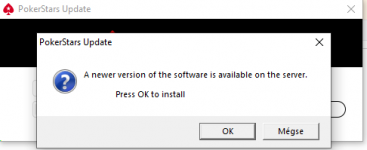
I can't update PS on the PC . Shows an error message like some germans recieved .
They blame my internet provider.
Funny thing is dear PS , I could update on my phone through the same provider via WLAN !
 
  • Like
  • Wow
  • Sad
Reactions: dallam, ADRI7HO, lacroir and 1 other person
Andyreas

Andyreas

Moderator
Moderator
Joined
May 25, 2022
Total posts
13,590
Awards
8
DE
Poker Chips
1,645
Casino Coins
0
  • #3
Maybe Germany screwed things up for everyone. When the Germans leave, nothing works anymore. 😜🤣

I hope it's just a temporary issue.

Or have there also been new laws in Hungary?
 
  • Haha
  • Wow
Reactions: Sunz of Beaches, ADRI7HO, G0930 and 1 other person
lacroir

lacroir

Rock Star
Bronze Level
Joined
Jan 3, 2023
Total posts
232
Awards
2
HU
Poker Chips
160
Casino Coins
0
  • #4
No, as far as I know there are no new laws... But if there were I would be shocked if they say we cannot play real money anymore..
 
  • Like
Reactions: Andyreas
lacroir

lacroir

Rock Star
Bronze Level
Joined
Jan 3, 2023
Total posts
232
Awards
2
HU
Poker Chips
160
Casino Coins
0
  • #5
Cannot contact them online via the Help, so just sent a message to PS Support on Twitter, hopefully they respond.
 
G0930

G0930

Captain Fathermucker, Satty Aficionado
Loyaler
Joined
Apr 17, 2015
Total posts
9,561
Awards
6
AT
Poker Chips
1,322
Casino Coins
5
  • #6
Andyreas said:
Maybe Germany screwed things up for everyone. When the Germans leave, nothing works anymore. 😜🤣
Isn't that the truth.. I think without Germany the EU would have collapsed long ago. 🤣
 
  • Haha
Reactions: lacroir and Andyreas
ADRI7HO

ADRI7HO

On the road...
Bronze Level
Joined
May 6, 2020
Total posts
7,296
Awards
9
Poker Chips
509
Casino Coins
0
  • #7
lacroir said:
Cannot contact them online via the Help, so just sent a message to PS Support on Twitter, hopefully they respond.
Andyreas said:
Maybe Germany screwed things up for everyone. When the Germans leave, nothing works anymore. 😜🤣

I hope it's just a temporary issue.

Or have there also been new laws in Hungary?
G0930 said:
Pokerstars is a mess today ..
I can't update PS on the PC . Shows an error message like some germans recieved .
They blame my internet provider.
Funny thing is dear PS , I could update on my phone through the same provider via WLAN !
I just tried to enter the PS software, it wanted to update itself, I pressed it as usual, but the update could not finish and exited!
So I can't start the software, now what? :eek:
I hope it's just a server problem and they'll fix it!!! 🤞

I might have to look for a new room :ROFLMAO:...
 
  • Haha
  • Like
Reactions: Andyreas, dallam and lacroir
lacroir

lacroir

Rock Star
Bronze Level
Joined
Jan 3, 2023
Total posts
232
Awards
2
HU
Poker Chips
160
Casino Coins
0
  • #8
So, I could get ahold of the Support...

IT'S BECAUSE OF YOU GERMANY!!!
Kidding... 😆

But, the problem was that I'm on my work laptop which is usually on a German VPN. And guess what, since today, PokerStars.EU won't work if you are from Germany (so you have German IP) - your account's country doesn't matter.

So, once I turned off VPN it works fine 😅
 
  • Like
Reactions: fundiver199 and ADRI7HO
ADRI7HO

ADRI7HO

On the road...
Bronze Level
Joined
May 6, 2020
Total posts
7,296
Awards
9
Poker Chips
509
Casino Coins
0
  • #9
I'm on Pokerstars.EU by default, but it won't start and update!

Maybe I should reload it, only then I have to set everything up again. :unsure:
 
dallam

dallam

Legend
Bronze Level
Joined
Aug 2, 2018
Total posts
3,137
Awards
28
Poker Chips
537
Casino Coins
0
  • #10
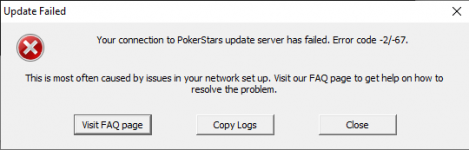
Today

Error1

Error2
 
  • Wow
Reactions: ADRI7HO
ADRI7HO

ADRI7HO

On the road...
Bronze Level
Joined
May 6, 2020
Total posts
7,296
Awards
9
Poker Chips
509
Casino Coins
0
  • #11
dallam said:
I have this too, but when I want to download it again, the start page of the installation software reminds me of the Play Money version, so I decided to cancel it. On the PokerStars Support
Twitter page, they write to other questions that they are working on some problem, so I'll wait a bit.
 
  • Like
Reactions: dallam
dallam

dallam

Legend
Bronze Level
Joined
Aug 2, 2018
Total posts
3,137
Awards
28
Poker Chips
537
Casino Coins
0
  • #12
ADRI7HO said:
I have this too, but when I want to download it again, the start page of the installation software reminds me of the Play Money version, so I decided to cancel it. On the PokerStars Support
Twitter page, they write to other questions that they are working on some problem, so I'll wait a bit.
PS live support gave this

Hey Player!

First, sorry for the inconvenience caused by this.


So, this indicates that there is an issue with your firewall, here is how to resolve it:

Restart your computer and power off/on any network equipment you have connected (i.e., modem, router, access points).

Once your computer has restarted, verify that your internet connection is working; then, reopen the program.If this fails, then...Configure your Firewall.
It will be something like this process, although the location may be different in each Firewall:Open the firewall control panel (often, you double-click the firewall icon near the Windows system clock or locate it under the Start Menu).
Choose the 'Programs' tab (or otherwise locate the program list).

You will find these items in the program list:
PokerStars.exe
PokerStarsUpdate.exe
PokerStarsCommunicate.exe
PokerstarsBr.exe
PokerStarsComp.exe (.NET only)
Tracer.exe
xc.exe
xcw.exe
xcwxp.exe

For each of these, changing 'Block All' to 'Permit All' (or to the least restrictive permissions) should be sufficient to permit you to access the site.
As mentioned, the instructions may vary, and for further help, you should contact the vendor of your firewall software.

I am sorry for the inconvenience.

If you have any question, please do not hesitate to contact us again.
 
  • Like
Reactions: ADRI7HO
Andyreas

Andyreas

Moderator
Moderator
Joined
May 25, 2022
Total posts
13,590
Awards
8
DE
Poker Chips
1,645
Casino Coins
0
  • #13
ADRI7HO said:
I have this too, but when I want to download it again, the start page of the installation software reminds me of the Play Money version, so I decided to cancel it. On the PokerStars Support
Twitter page, they write to other questions that they are working on some problem, so I'll wait a bit.
I also had to download the update manually from the Pokerstars Update as the automatic download failed.
 
  • Like
Reactions: ADRI7HO
ADRI7HO

ADRI7HO

On the road...
Bronze Level
Joined
May 6, 2020
Total posts
7,296
Awards
9
Poker Chips
509
Casino Coins
0
  • #14
dallam said:
PS live support gave this

Hey Player!

First, sorry for the inconvenience caused by this.


So, this indicates that there is an issue with your firewall, here is how to resolve it:

Restart your computer and power off/on any network equipment you have connected (i.e., modem, router, access points).

Once your computer has restarted, verify that your internet connection is working; then, reopen the program.If this fails, then...Configure your Firewall.
It will be something like this process, although the location may be different in each Firewall:Open the firewall control panel (often, you double-click the firewall icon near the Windows system clock or locate it under the Start Menu).
Choose the 'Programs' tab (or otherwise locate the program list).

You will find these items in the program list:
PokerStars.exe
PokerStarsUpdate.exe
PokerStarsCommunicate.exe
PokerstarsBr.exe
PokerStarsComp.exe (.NET only)
Tracer.exe
xc.exe
xcw.exe
xcwxp.exe

For each of these, changing 'Block All' to 'Permit All' (or to the least restrictive permissions) should be sufficient to permit you to access the site.
As mentioned, the instructions may vary, and for further help, you should contact the vendor of your firewall software.

I am sorry for the inconvenience.

If you have any question, please do not hesitate to contact us again.

If it works, please write!
 
G0930

G0930

Captain Fathermucker, Satty Aficionado
Loyaler
Joined
Apr 17, 2015
Total posts
9,561
Awards
6
AT
Poker Chips
1,322
Casino Coins
5
  • #15
dallam said:
PS live support gave this

Hey Player!

First, sorry for the inconvenience caused by this.


So, this indicates that there is an issue with your firewall, here is how to resolve it:

Restart your computer and power off/on any network equipment you have connected (i.e., modem, router, access points).

Once your computer has restarted, verify that your internet connection is working; then, reopen the program.If this fails, then...Configure your Firewall.
It will be something like this process, although the location may be different in each Firewall:Open the firewall control panel (often, you double-click the firewall icon near the Windows system clock or locate it under the Start Menu).
Choose the 'Programs' tab (or otherwise locate the program list).

You will find these items in the program list:
PokerStars.exe
PokerStarsUpdate.exe
PokerStarsCommunicate.exe
PokerstarsBr.exe
PokerStarsComp.exe (.NET only)
Tracer.exe
xc.exe
xcw.exe
xcwxp.exe

For each of these, changing 'Block All' to 'Permit All' (or to the least restrictive permissions) should be sufficient to permit you to access the site.
As mentioned, the instructions may vary, and for further help, you should contact the vendor of your firewall software.

I am sorry for the inconvenience.

If you have any question, please do not hesitate to contact us again.

Yes I have the same error message but I somehow doubt we all have firewalls which block PS all of a sudden.
More likely PS ****ed this up real good
 
  • Like
Reactions: ADRI7HO and dallam
dallam

dallam

Legend
Bronze Level
Joined
Aug 2, 2018
Total posts
3,137
Awards
28
Poker Chips
537
Casino Coins
0
  • #16
ADRI7HO said:
If it works, please write!

The client is opening from the folder ( C:\Program Files (x86)\PokerStars.EU ) , and it not even ask for an update.

However the client from the desktop is asking about an update and still not working --> same error message.

So I'm 100% sure they messed up something. Cause my IC is fine and let every single program they said through the Firewall but nothing changed on the destop. However FOR NOW the client starts from the FOLDER without updating :oops:
 
  • Like
  • Wow
Reactions: ADRI7HO and G0930
G0930

G0930

Captain Fathermucker, Satty Aficionado
Loyaler
Joined
Apr 17, 2015
Total posts
9,561
Awards
6
AT
Poker Chips
1,322
Casino Coins
5
  • #17
dallam said:
The client is opening from the folder ( C:\Program Files (x86)\PokerStars.EU ) , and it not even ask for an update.

However the client from the desktop is asking about an update and still not working --> same error message.

So I'm 100% sure they messed up something. Cause my IC is fine and let every single program they said through the Firewall but nothing changed on the destop. However FOR NOW the client starts from the FOLDER without updating :oops:
Well that's at least something. .
But as usual we are at fault and not Pokerstars 🙄
 
  • Like
Reactions: dallam
dallam

dallam

Legend
Bronze Level
Joined
Aug 2, 2018
Total posts
3,137
Awards
28
Poker Chips
537
Casino Coins
0
  • #18
G0930 said:
Well that's at least something. .
But as usual we are at fault and not Pokerstars 🙄

I mean their Support do help, and they do it fast! But you are so on point as well- often they help you to correct their mistake and saying it was actually yours.
 
  • Like
Reactions: ADRI7HO
dino

dino

10 cevapcici = 0 stress
Loyaler
Joined
Jan 14, 2007
Total posts
7,379
Awards
5
DE
Poker Chips
1,512
Casino Coins
0
  • #19
you can try to open with right click on it, and run as admin
that may do the trick.
Or download new ps client from their web site, and install.
 
  • Like
  • Love
Reactions: G0930 and ADRI7HO
ADRI7HO

ADRI7HO

On the road...
Bronze Level
Joined
May 6, 2020
Total posts
7,296
Awards
9
Poker Chips
509
Casino Coins
0
  • #20
G0930 said:
Well that's at least something. .
But as usual we are at fault and not Pokerstars 🙄
dallam said:
I mean their Support do help, and they do it fast! But you are so on point as well- often they help you to correct their mistake and saying it was actually yours.
dino said:
you can try to open with right click on it, and run as admin
that may do the trick.
Or download new ps client from their web site, and install.
Thanks Dino! 🤜🤛:)

"you can try to open with right click on it, and run as admin" worked and finally the software was able to update and I was able to log in!

Try it guys, it worked for me! (y)
 
G0930

G0930

Captain Fathermucker, Satty Aficionado
Loyaler
Joined
Apr 17, 2015
Total posts
9,561
Awards
6
AT
Poker Chips
1,322
Casino Coins
5
  • #21
dino said:
you can try to open with right click on it, and run as admin
that may do the trick.
Or download new ps client from their web site, and install.
that worked , thanks for the tip :)
so obvious I didn't even think of it. never was necessary with PS before
 
PokerStars Reviews: Français, Nederlands, Deutsch, Dansk, Italiano, Español, Polski, Norsk, Português, Svenska - PokerStars Mobile - Deutsch Mobile - PS Casino Real Money Poker - Real Money Casinos
Top