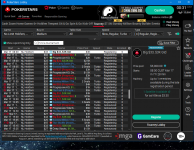
PokerStars Home Games has disappeared!

najisami

najisami

Legend
Loyaler
Joined
Aug 11, 2014
Total posts
8,946
Awards
17
MA
Poker Chips
4,177
Casino Coins
360
  • #1
Hey guys,
I was surprised to see that the Home Games button is not on PS lobby today ! Is it just me ?

Screenshot   3 17 2023  12 31 23 AM
 
Sebbour

Sebbour

Legend
Loyaler
Joined
Mar 10, 2009
Total posts
1,387
Awards
8
HR
Poker Chips
453
Casino Coins
0
  • #2
najisami said:
Hey guys,
I was surprised to see that the Home Games button is not on PS lobby today ! Is it just me ?

View attachment 326974
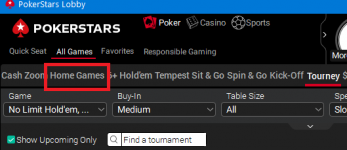
Do you mean this one or something else? I took this from your picture

1679010376156
 
  • Like
Reactions: neak and najisami
najisami

najisami

Legend
Loyaler
Joined
Aug 11, 2014
Total posts
8,946
Awards
17
MA
Poker Chips
4,177
Casino Coins
360
  • #3
Sebbour said:
Do you mean this one or something else? I took this from your picture

View attachment 326976
Omg ! I'm getting blind man. It used to be between Settings and Tools on the bottom right. I didn't notice the change.
Thank you very much Sebbour.
 
  • Like
  • Haha
Reactions: lacroir, Joe, neak and 2 others
YLAN

YLAN

Sida Nga Taraki
Loyaler
Joined
Jan 21, 2023
Total posts
3,015
Awards
9
PH
Poker Chips
1,413
Casino Coins
195
  • #4
najisami said:
Omg ! I'm getting blind man. It used to be between Settings and Tools on the bottom right. I didn't notice the change.
Thank you very much Sebbour.
Does it work for you? It doesn't work for me? @Marcwantstowin @Tammy any idea on below error?
Hg
 
Last edited:
  • Like
Reactions: Tadi and neak
najisami

najisami

Legend
Loyaler
Joined
Aug 11, 2014
Total posts
8,946
Awards
17
MA
Poker Chips
4,177
Casino Coins
360
  • #5
YLAN said:
Does it work for you? It doesn't work for me? @Marcwantstowin @Tammy any idea on below error?
View attachment 326991
Yes it does. Just tried right now. It has a new look/design, nicer than before.
And btw, did you try closing the client and reopening it again ?
 
Last edited:
Gritz18

Gritz18

Legend
Platinum Level
Joined
Jan 18, 2022
Total posts
6,355
Awards
3
BR
Poker Chips
1,310
Casino Coins
0
  • #6
I just tested mine is working 100%.
 
Marshmalo1994

Marshmalo1994

Legend
Loyaler
Joined
Sep 17, 2022
Total posts
3,223
Awards
1
AR
Poker Chips
1,491
Casino Coins
0
  • #7
I don't know if this is the case, but I can only see the home games through the App.
 
Gallarado777

Gallarado777

Legend
Bronze Level
Joined
Jun 19, 2022
Total posts
5,546
Awards
3
KZ
Poker Chips
304
Casino Coins
0
  • #8
Yes, everything works, he just didn't notice a little bit, I hope he'll look at his photo and see everything fine, it happens in a hurry everything was done
 
najisami

najisami

Legend
Loyaler
Joined
Aug 11, 2014
Total posts
8,946
Awards
17
MA
Poker Chips
4,177
Casino Coins
360
  • #9
Marshmalo1994 said:
I don't know if this is the case, but I can only see the home games through the app.
You mean on Pokerstars lobby ?
 
Dejana

Dejana

Meat pounder 🥩
Loyaler
Joined
Mar 23, 2015
Total posts
4,517
Awards
15
RS
Poker Chips
1,032
Casino Coins
0
  • #10

YLAN said:
Does it work for you? It doesn't work for me? @Marcwantstowin @Tammy any idea on below error?
View attachment 326991
Serbian players have the same problem - reinstall PS platform, with the first login Home Game tab it goes to upper between Settings and Tools again...but, every time I want to play in PS home games, I have to reinstall it again...
 
Alexey Shley

Alexey Shley

Visionary
Bronze Level
Joined
Nov 21, 2020
Total posts
672
Awards
2
BY
Poker Chips
124
Casino Coins
0
  • #11
I also can't access home games from my computer, and I don't know what to do about it, I log in from my phone, I'm fine, but as soon as I log in from my computer, I get an error. Why? Who can answer this question for me?
 
Marshmalo1994

Marshmalo1994

Legend
Loyaler
Joined
Sep 17, 2022
Total posts
3,223
Awards
1
AR
Poker Chips
1,491
Casino Coins
0
  • #12
najisami said:
You mean on Pokerstars lobby ?
No, I ment that I was never able to get in the home games in the PC software, but in the mobile app I'm able to see it and enter normally
 
  • Wow
Reactions: najisami
Roobz75

Roobz75

So n' Sew
Loyaler
Joined
Apr 13, 2020
Total posts
2,050
Awards
4
GB
Poker Chips
557
Casino Coins
0
  • #13
Sebbour said:
Do you mean this one or something else? I took this from your picture

View attachment 326976
Hasn't been loading on my computer now and again. Screen just ends up black, or stuck on the front screen. Had to log out and relog a few times on PS, getting it to work.
 
najisami

najisami

Legend
Loyaler
Joined
Aug 11, 2014
Total posts
8,946
Awards
17
MA
Poker Chips
4,177
Casino Coins
360
  • #14
Marshmalo1994 said:
No, I ment that I was never able to get in the home games in the PC software, but in the mobile app I'm able to see it and enter normally
WOW ! That's weird, it's supposed to be the other way around !
 
  • Like
Reactions: Marshmalo1994
najisami

najisami

Legend
Loyaler
Joined
Aug 11, 2014
Total posts
8,946
Awards
17
MA
Poker Chips
4,177
Casino Coins
360
  • #15
Alexey Shley said:
I also can't access home games from my computer, and I don't know what to do about it, I log in from my phone, I'm fine, but as soon as I log in from my computer, I get an error. Why? Who can answer this question for me?
Now it looks like there are a few of you guys having this issue. I think one of you should contact support.
 
Tammy

Tammy

I'm Here to Help
Administrator
Joined
May 18, 2005
Total posts
64,055
Awards
14
US
Poker Chips
2,488
Casino Coins
35
  • #16
guj555 said:
Hello ! I (GUZHIK) registered a week and a half ago in the tournament 3536676052

Cardschat Monthly 1000 Freeroll
, but yesterday I saw that I was removed from registration, why?

YLAN said:
Does it work for you? It doesn't work for me? @Marcwantstowin @Tammy any idea on below error?
View attachment 326991

Marshmalo1994 said:
I don't know if this is the case, but I can only see the home games through the app.

Alexey Shley said:
I also can't access home games from my computer, and I don't know what to do about it, I log in from my phone, I'm fine, but as soon as I log in from my computer, I get an error. Why? Who can answer this question for me?
It seems like this is a more widespread problem than I thought. I would suggest uninstalling and reinstalling the software to see if that helps clear it up.
 
Tadi

Tadi

Visionary
Platinum Level
Joined
Aug 18, 2016
Total posts
713
Awards
3
BA
Poker Chips
1,015
Casino Coins
0
  • #17
YLAN said:
Does it work for you? Doesn't work to me? @Marcwantstowin @Tammy have any idea of the error below? Does it work for you? Doesn't work to me? @Marcwantstowin @Tammy have any idea of the error below?
View attachment 326991
Yes. It works normally after I accepted cookies.
 
R

rachelle2291

Legend
Bronze Level
Joined
Jun 30, 2018
Total posts
1,873
Awards
9
Poker Chips
27
Casino Coins
0
  • #18
It often doesn't load for me. I had way less problems when homegames was on the bottom right in the lobby
 
najisami

najisami

Legend
Loyaler
Joined
Aug 11, 2014
Total posts
8,946
Awards
17
MA
Poker Chips
4,177
Casino Coins
360
  • #19
rachelle2291 said:
It often doesn't load for me. I had way less problems when homegames was on the bottom right in the lobby
Yeah rachelle, it looks like you are not the only one. A good thing to do first is what Tammy said above. Uninstall the whole thing. But I recommend using RevoUninstaller. That way you also remove all the left overs as opposed to uninstalling it from Control Panel.
 
najisami

najisami

Legend
Loyaler
Joined
Aug 11, 2014
Total posts
8,946
Awards
17
MA
Poker Chips
4,177
Casino Coins
360
  • #20
YLAN said:
Does it work for you? It doesn't work for me? @Marcwantstowin @Tammy any idea on below error?
View attachment 326991
Hi YLAN,
I think stars support is what you need. They know what those error messages mean. Just contact them and attach that screenshot to your email.
 
T

The Tea Caddy

Rising Star
Bronze Level
Joined
Apr 5, 2023
Total posts
1
GB
Poker Chips
26
Casino Coins
0
  • #21
I've had an issue with not being able to access the Home Game lobby on a Mac running Mojave (macOS 10.14) and Catalina (macOS 10.15). Home Games is there in the toolbar along the top of the main lobby, but when I click on it, I just get the generic Home Games splash screen. I contacted PS support and apparently this is a known problem. They didn't say if it was specific to Mac, or to particular versions of macOS... It's clearly not all Macs because my MacBook Air running Ventura (macOS 13) isn't affected. I tried reinstalling from scratch on my Catalina partition with the following result. When PokerStars first launched, the Home Games selection tab was halfway down the right-hand side of the lobby window (where it used to live a while back), and I was able to access my Home Game lobby as normal. (Incidentally, all the graphics and dialogs looked a bit retro, as if I was using an old version of the software.) However, after restarting PokerStars, the graphics had updated, the Home Games selection tab had moved up to its newer location in the top toolbar, and the Home Game lobby was AWOL once more. Very disappointing. It looks like PokerStars doesn't do Home Games right with older versions of macOS (pre 11?). If this is the case, I'm pessimistic about a fix coming any time soon, if at all. Got my fingers crossed, though, because the chair in front of my Mojave/Catalina workstation is extremely comfortable.
 
C

Cooking

Legend
Loyaler
Joined
May 19, 2011
Total posts
3,087
Awards
2
Poker Chips
867
Casino Coins
0
  • #22
I never know when I'm going to be able to access the home games. I'm in a group and a couple of weeks ago there were a tournament, but when I tried to access it appeared an error message, but today I was able to see the home games tournaments.
 
najisami

najisami

Legend
Loyaler
Joined
Aug 11, 2014
Total posts
8,946
Awards
17
MA
Poker Chips
4,177
Casino Coins
360
  • #23
The Tea Caddy said:
. It's clearly not all Macs because my MacBook Air running Ventura (macOS 13) isn't affected. I tried reinstalling from scratch on my Catalina partition with the following result.
Cooking said:
I never know when I'm going to be able to access the home games. I'm in a group and a couple of weeks ago there were a tournament, but when I tried to access it appeared an error message, but today I was able to see the home games tournaments
Yeah guys, it looks like this is an ongoing issue since they moved the Home Game button to the tool bar. They know about it, so let's see how long they gonna take to fix it.
 
Roobz75

Roobz75

So n' Sew
Loyaler
Joined
Apr 13, 2020
Total posts
2,050
Awards
4
GB
Poker Chips
557
Casino Coins
0
  • #24
The Tea Caddy said:
I've had an issue with not being able to access the Home Game lobby on a Mac running Mojave (macOS 10.14) and Catalina (macOS 10.15). Home Games is there in the toolbar along the top of the main lobby, but when I click on it, I just get the generic Home Games splash screen. I contacted PS support and apparently this is a known problem. They didn't say if it was specific to Mac, or to particular versions of macOS... It's clearly not all Macs because my MacBook Air running Ventura (macOS 13) isn't affected. I tried reinstalling from scratch on my Catalina partition with the following result. When PokerStars first launched, the Home Games selection tab was halfway down the right-hand side of the lobby window (where it used to live a while back), and I was able to access my Home Game lobby as normal. (Incidentally, all the graphics and dialogs looked a bit retro, as if I was using an old version of the software.) However, after restarting PokerStars, the graphics had updated, the Home Games selection tab had moved up to its newer location in the top toolbar, and the Home Game lobby was AWOL once more. Very disappointing. It looks like PokerStars doesn't do Home Games right with older versions of macOS (pre 11?). If this is the case, I'm pessimistic about a fix coming any time soon, if at all. Got my fingers crossed, though, because the chair in front of my Mojave/Catalina workstation is extremely comfortable.
Don't think it's your computer, it's more to do with the website. It's happened a couple of times to me on a Dell computer running Windows 11/Google.
Pokerstars is constantly updating and any website that does that, struggles to run properly (Ebay)
As the saying goes "if it ain't broke, don't try to fix it"....
 
antonis32123

antonis32123

Legend
Loyaler
Joined
Dec 25, 2014
Total posts
7,382
Awards
20
GR
Poker Chips
623
Casino Coins
100
  • #25
I cannot play homegames at PS in Greece , so .... Still cannot figure out why they do not allow us . Lol
 
PokerStars Reviews: Français, Nederlands, Deutsch, Dansk, Italiano, Español, Polski, Norsk, Português, Svenska - PokerStars Mobile - Deutsch Mobile - PS Casino Organize a Home Poker Game Top 10 Games
Top