screen shots

B

bonuswhore

Rising Star
Bronze Level
Joined
Jul 26, 2006
Total posts
6
Poker Chips
0
Casino Coins
0
  • #1
Hey guys i was just wondering if someone could explain how to take those handy screeshots so i can do it as well!!:)
 
Dorkus Malorkus

Dorkus Malorkus

Mod Emeritus
Bronze Level
Joined
Jul 12, 2005
Total posts
12,421
Poker Chips
0
Casino Coins
0
  • #2
Alt+PrtScrn ---> Open Paint ---> Ctrl+V ---> Save ---> Upload.
 
Bombjack

Bombjack

Legend
Silver Level
Joined
Jul 6, 2006
Total posts
2,389
Poker Chips
0
Casino Coins
0
  • #3
Try pressing the Prnt Scrn button on your keyboard - it copies the screen to the clipboard. Alt+Prnt Scrn = copy the window.

Paste into a paint program, save as jpeg, and hoop-la...
 
B

bonuswhore

Rising Star
Bronze Level
Joined
Jul 26, 2006
Total posts
6
Poker Chips
0
Casino Coins
0
  • #4
thanks

well thanks, i wish i had of knew that when i hit my royal flushes i would have taken a pic instead of emailin the hand summery to myself. This is now my new fav site see u guys in the freeroll commin up1:cool:
 
ChuckTs

ChuckTs

Legend
Silver Level
Joined
Feb 2, 2005
Total posts
13,642
Poker Chips
0
Casino Coins
0
  • #5
Alt+Prnt Scrn....I never knew that one :eek:
I just always hit PrintScreen, and edited the SS from there...
 
Stick66

Stick66

Legend
Silver Level
Joined
Nov 10, 2005
Total posts
6,374
Poker Chips
0
Casino Coins
0
  • #6
I use Shift+PrintScreen.

Don't forget to resize and crop!
 
goffman73

goffman73

Rock Star
Silver Level
Joined
Jul 24, 2006
Total posts
189
Poker Chips
0
Casino Coins
0
  • #7
I just hit printscreen then open MSPaint and paste then save.
 
Bombjack

Bombjack

Legend
Silver Level
Joined
Jul 6, 2006
Total posts
2,389
Poker Chips
0
Casino Coins
0
  • #8
What does the Shift do??
 
Stick66

Stick66

Legend
Silver Level
Joined
Nov 10, 2005
Total posts
6,374
Poker Chips
0
Casino Coins
0
  • #9
Bombjack said:
What does the Shift do??

My Print Screen key shares the Sys Req function. Print Screen is the upper half of the key so I must shift to use it.
 
Lo-Dog

Lo-Dog

Cardschat Elite
Silver Level
Joined
Apr 11, 2006
Total posts
2,240
Poker Chips
0
Casino Coins
0
  • #10
MrSticker said:
My Print Screen key shares the Sys Req function. Print Screen is the upper half of the key so I must shift to use it.


Unless you have some messed up keyboard you dont have to hold shift to do a prnt scrn. It is in the top half but its a function key so no shift should be needed.:)
 
joosebuck

joosebuck

Legend
Silver Level
Joined
Jan 14, 2006
Total posts
4,193
Awards
1
Poker Chips
3
Casino Coins
0
  • #11
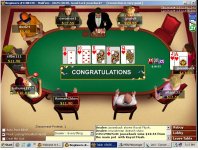
thought this deserved a beaut of a SS.
 

Attachments

  • ROYAL FLUSH LOL.JPG
    ROYAL FLUSH LOL.JPG
    112.8 KB · Views: 27
joosebuck

joosebuck

Legend
Silver Level
Joined
Jan 14, 2006
Total posts
4,193
Awards
1
Poker Chips
3
Casino Coins
0
  • #12
the dude i beat had quad kings
 
Lo-Dog

Lo-Dog

Cardschat Elite
Silver Level
Joined
Apr 11, 2006
Total posts
2,240
Poker Chips
0
Casino Coins
0
  • #13
joosebuck said:
the dude i beat had quad kings
:eek:

nice screenshot indeed.
 
Gizzi315

Gizzi315

Rock Star
Silver Level
Joined
Oct 22, 2005
Total posts
420
Poker Chips
0
Casino Coins
0
  • #14
I don't think it gets much prettier than that Joosebuck! CONGRATULATIONS indeed!

:party: :party:
:congrats: :congrats: :congrats: :congrats: :congrats: :congrats: :congrats: :congrats:
:beer: :beer: :beer: :cheers: :cheers: :cheers:
:cheers: :cheers: :cheers: :beer::beer::beer:
:party::party:
 
Bombjack

Bombjack

Legend
Silver Level
Joined
Jul 6, 2006
Total posts
2,389
Poker Chips
0
Casino Coins
0
  • #15
Shame you weren't playing on one of those "bad beat" tables - you'd have won a fortune!
 
Stick66

Stick66

Legend
Silver Level
Joined
Nov 10, 2005
Total posts
6,374
Poker Chips
0
Casino Coins
0
  • #16
Lo-Dog said:
Unless you have some messed up keyboard you dont have to hold shift to do a prnt scrn. It is in the top half but its a function key so no shift should be needed.:)
You are right! Thanks! I'm a dumbass. Forget I said anything.

.....Mommy???? :pcguru: :damnmate:
 
Top