Play without Pokerstars Aurora Graphics Engine - 2021

  • Thread starter Thread starter Edu1
  • Start date Start date
LastAngel999 said:
it just doesn't work for me anymore. There is always PokerLegacyTable = 1 (user file).


It doesn't work for me either, do you play on pokerstars.com or a separate liquidity? ( .fr .it ) etc
 
LastAngel999 said:
for me it is not working.. i play on ps.it 🙁


Iplay on stars.it too, maybe those bastards have made it so that everyone is forced to play with aurora
 
Maybe i have a solution, we will need the installation files of pokerstars .com and replace them with those of .it
 
I also play on pokerstars and unfortunately with aurora, I say unfortunately because it still causes problems to this day and I also wrote to support that I had problems with it and asked if you can turn it off. When they told me that it was at my own risk and that they would no longer support me in the future, I just left the aurora. Except for a few small things like when a tournament starts in a minute ps hangs up or when I play 2 tournaments and fly out of one ps hangs up too, I can play pretty normally again. But it's not like it used to be anymore
 
I have been using this method for a long time. But they say that soon this method will no longer work. Everyone will have to switch to Aurora.
 
it is impossible for me playing with Aurora... i have no problem there are a lot of other sites.. bye bye pokerstars
 
Zapahlohotrona said:
I have been using this method for a long time. But they say that soon this method will no longer work. Everyone will have to switch to Aurora.


can u post the email or message where they said this? thanks.
 
Can any of you send the complete image of user file? workin on it there will be a way to disable Aurora i think
 
you can still go into your PokerStars folder and there is a folder called "backup". If you copy everything from there into the main PokerStars folder, then you should be able to use the old software again by adding the "LegacyPokerTable=1" in the user.ini file. Just run PokerStars from PokerStars.exe, so the software isn't updated again ( send shortcut to desktop).
 
BullXT said:
many players don't like Aurora Graphics Engine, this thread I will show how I'm playing without this

I also don't like , I've been playing without this and it's working fine


1> open pokerstars, and click in the help button, and after open "open my setting folder" here:

8af5acc7397e5558c54e8f0c1be20812.png


2> will open this folder:

da5b9b9eebc65972d5d6c7030c5f23e1.png


localize the "user.ini" file, open with the notepad, after that

localize this:

[PipeOption]

below this text "[PipeOption]" you need to paste this text:

LegacyPokerTable=1

it need to look exactly like this

e1a5ca659c2dd13b7f811895af4e168c.png


save the file


done

after that open pokerstars and play - gg gg :joyman::top:
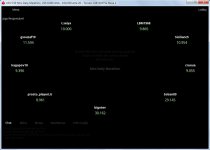
Don't forget to close the client tab when you are busy in notepad, and especially don't forget to restart your computer when you are finished🙂

Great post BTW:smile:

Good luck all 😎
 
I play without it and it's just fine , my laptop get to its limits with the aurora graphic machine , when its on , and annoying problems begin .
 
is there still a way to go back to the old design? somebody knows? thanks.
 
It was working until yesterday. Today, after this last update, the black screen has opened again and also the slowest program. I tried to do the same method with Aurora Graphics Engine disabled and nothing changed.

Does anyone have any solution for this?

Untitled 1
 
Exactly, I have the same problem. If someone has any way to go back to the old skin , write.
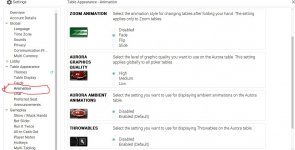
 
saha2000 said:
Exactly, I have the same problem. If someone has any way to go back to the old skin , write.

They confirmed to me today that it is not possible to disable, because the Aurora is now the default graphics engine. Now we will have to use it this way opening with the black screen.

Ron112355 said:

This doesn't disable the Aurora Graphics.
 
Back
Top