I just returned to the CardsChats community and all the poker rooms. I hadn't played for about 15 months., but I'm back to try again.
What I did notice yesterday was that after updating the Pokerstars Lobby, I couldn't log in to my PC, because I couldn't accept the terms due to an error 118 that appeared everywhere. I had to enter through the
App on my cell phone and accept the terms and try again on the PC. I could play on my cell phone but I find it very uncomfortable and I don't know if you can play multiple tables.
So I finally managed to log in and to my surprise I couldn't see the Spin&Go, nothing in the tournament tabs, the rewards system, everything was Error 118.
Search on Google to solve the problem. It said it was the Lobby cache, so I deleted them and nothing.
I deleted the Game and then something worse came. No, the pokerstars website wouldn't let me download the installer (total madness). Google told me that it could be the outdated Chrome browser, I updated it and it didn't.
I went with the default browser that Windows comes with because it told me to use another browser. Then I was finally able to download an installer. Finally I proceeded to install and download the entire lobby again. After loading, I got a message that that version was obsolete and I should update it. I started to update and then it told me that it did not correspond to my living area, and I updated it again and it sent me back again, where it told me again that it was an obsolete update. IT DID NOT WORK, I had to uninstall everything again. and it occurred to me to take an old installer that I got in Windows downloads 2 years ago and there I started the whole process again.
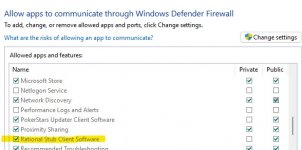
In the end I wanted to do the same and I thought about the firewall where I had allowed several applications and .exe programs from the Pokerstars installation folder. It was like seven (7) pokerstars executables and I finally did it. It was like 4 hours of torture.
Finally I could see the lobby with everything normal.