ACR Thread

  • Thread starter Thread starter ACR Rep
  • Start date Start date
Status
Not open for further replies.
mountainfox said:
Hello guys, I am thinking about buying a mac laptop, but I just want to make sure you can actually download it on BCP. Their site confuses me because on the frequently ask questions page, it says, we currently dont support mac, but on the download page, it says we got you covered whether you have windows or mac. So does BCP work on mac laptop or not? If not, I guess I will just buy a Dell then.
Hello,
You can buy the laptop you like the most.
Just follow this Download Link and click either on:
  • Windows users click here to download.
  • Mac users click here to download.
Hope you find this helpful, thank you for playing with us! 😎
 
  • Like
Reactions: mountainfox
lovemiscou said:
I downloaded BCP today and get same pop up, I am on a new device tho. I received an email with a code but it doesn't work, tried it a few times, what do you suggest I do^
Hi,

Here are the instruction we provide to our players:

1. Find your main directory in file explorer!
2. Find ACR/BCP folder
3. Rename it or delete it
4. Delete Americas Card Room / Black Chip Poker from your computer in Control Panel
5. Restart your computer
6. Download and install
7. Sign in and enjoy!

https://www.blackchippoker.eu/downloading/

If after these instructions and different App installer you are still not able to properly log in and play, we highly recommend you to directly contact Americas Cardroom Support Staff, as they will gladly help you. Click on the “Support” tab at the top of our website to access our live chat feature or email [email protected] for 24/7 help.
 
Tournament Results

When will the maintenance issues be resolved with the tournament results in both the cashier & "Finished Tournaments" on the web page? This has been a forever issue.
I love ACR & pretty much the only room I play at but I really want & need to be able to easily pull up these results/
 
Shells said:
Ah, ok.

I should also mention I am not the only one this happening to.


This has happened to me loads, sometimes I have changed computer but most of the time it is on my regular PC.

Fortunately the email is normally there.Don't forget to double check junk!
 
  • Like
Reactions: Shells
Shells said:
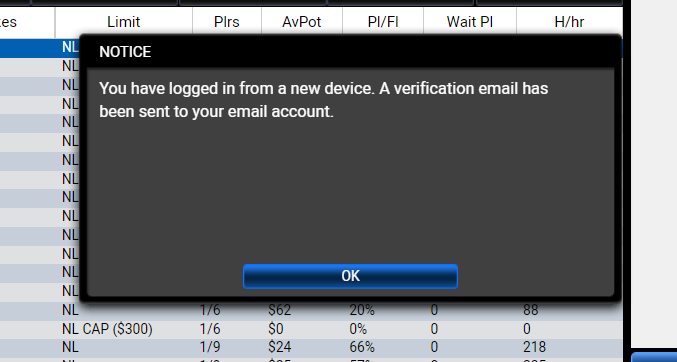
Over the past several weeks, when logging into ACR I will get this...

87b0f70b6e27b502eeee15366ddb2590.png


First of all, I have never logged into ACR or any other skin of WPN on any other device, than the one I am currently working on. Secondly, I have yet to receive a 'verification email' after several attempts.

If I restart my computer (which we shouldn't need to do) then I can log into ACR successfully. Before anyone suggests to clear cookies, etc. I do daily maintenance.


This is more of a heads-up and PLEASE pass this on to your tech department.
This happens to me every time my computer updates or needs to restart. It has been happening about 1 1/2 months.
 
0cean said:
When will the maintenance issues be resolved with the tournament results in both the cashier & "Finished Tournaments" on the web page? This has been a forever issue.
I love ACR & pretty much the only room I play at but I really want & need to be able to easily pull up these results/


First of all, appreciate the time and patience reporting this, I've sent it to the department in charge so they can take a look at this.
 
All Rise said:
This happens to me every time my computer updates or needs to restart. It has been happening about 1 1/2 months.


Thank you for bringing this concern to us. If you are not using a new device, then we suggest you change your password for security reasons. Our security system only prompts users if a new device is trying to use your account. To change your password please go to the “Forgot password” Link on the login page.
 
azforlife said:
ACR WHY IS THERE NO COPY/PASTE ALLOWED IN THE PASSWORD FIELD? PLEASE CHANGE IT ON UPCOMING UPDATE! I HATE TYPING UE9WH7NKHS 😀 THANKS

why are you screaming? I know it's frustrating, I hate typing too 🙂
when you copy the password and get to the password request, hold down the control key(bottom left) and press the "v" key to print the password in the box 🙂
 
  • Like
Reactions: vuk011
azforlife said:
ACR WHY IS THERE NO COPY/PASTE ALLOWED IN THE PASSWORD FIELD? PLEASE CHANGE IT ON UPCOMING UPDATE! I HATE TYPING UE9WH7NKHS 😀 THANKS

jaymfc said:
why are you screaming? I know it's frustrating, I hate typing too 🙂
when you copy the password and get to the password request, hold down the control key(bottom left) and press the "v" key to print the password in the box 🙂
Copy/paste to both the log-in and CC freeroll pwd fields works fine for me on my Mac,
 
ACR Rep said:
Thank you for bringing this concern to us. If you are not using a new device, then we suggest you change your password for security reasons. Our security system only prompts users if a new device is trying to use your account. To change your password please go to the “Forgot password” Link on the login page.
Well ... maybe that's what it was designed to do, but I've been using the same computer for seven years. No, there's some other reason. I have the same "new device" issue as well with the Pokerstars webpage log-in, but not the app. Every time. But, they have 2-step verification so they always send me a text message every time I log in to the web page. I don't believe ACR has that yet, but I would REALLY recommend it.
 
MattRyder said:
Well ... maybe that's what it was designed to do, but I've been using the same computer for seven years. No, there's some other reason. I have the same "new device" issue as well with the Pokerstars webpage log-in, but not the app. Every time. But, they have 2-step verification so they always send me a text message every time I log in to the web page. I don't believe ACR has that yet, but I would REALLY recommend it.


Truly appreciate your suggestion related to the 2-step verification, I will send it over to the department in charge, so they can take this into consideration for future improvements.
 
MattRyder said:
Well ... maybe that's what it was designed to do, but I've been using the same computer for seven years. No, there's some other reason. I have the same "new device" issue as well with the Pokerstars webpage log-in, but not the app. Every time. But, they have 2-step verification so they always send me a text message every time I log in to the web page. I don't believe ACR has that yet, but I would REALLY recommend it.


This happens to me every time I clear internet cookies in my browser. You might have clicked the option "clear history on exit" so every time you shut down the computer all cookies are cleared. Even though you have downloaded the poker app, it still uses your browser for authentication purposes. Hope this helps.
 
ACR Sucks

Ever since this site has updated its software it has sucked. We went through all the crashes and freezes hoping that the new version would eventually iron out all the wrinkles and we would get back to quality play, but you have removed skill from the game. Every tournament I play I see and take bad beat after bad beat. I played in two tournaments last night and every time someone had pocket aces (there were at least 4 and I held them once), they got beat, every ace king hand lost (there were 5 or six and I beat one with 56 and lost with mine). I know this is a small sample size, but this is just an example. I was playing regularly on ACR until the update and was very pleased, after all of the freezes and downtime I migrated to other sites and my ACR time slowed down. Now it is coming to an end. You have reduced poker to a game of shove and pray you have the worst of it preflop because you are sure to win in the end. Goodby ACR. 😡😡😡😡😡😡😡😡😡😡😡😡😡😡😡😡😡😡😡
 
  • Like
Reactions: HeyMan
ARC, BCP High 5

As always thank and I'm really starting to like the CC info and very quick answers and everything in general!!!
 
  • Like
Reactions: ACR Rep
Cool, I will definitely buy a Mac now. I am tired of using computers that aren't fast enough.
 
  • Like
Reactions: ACR Rep
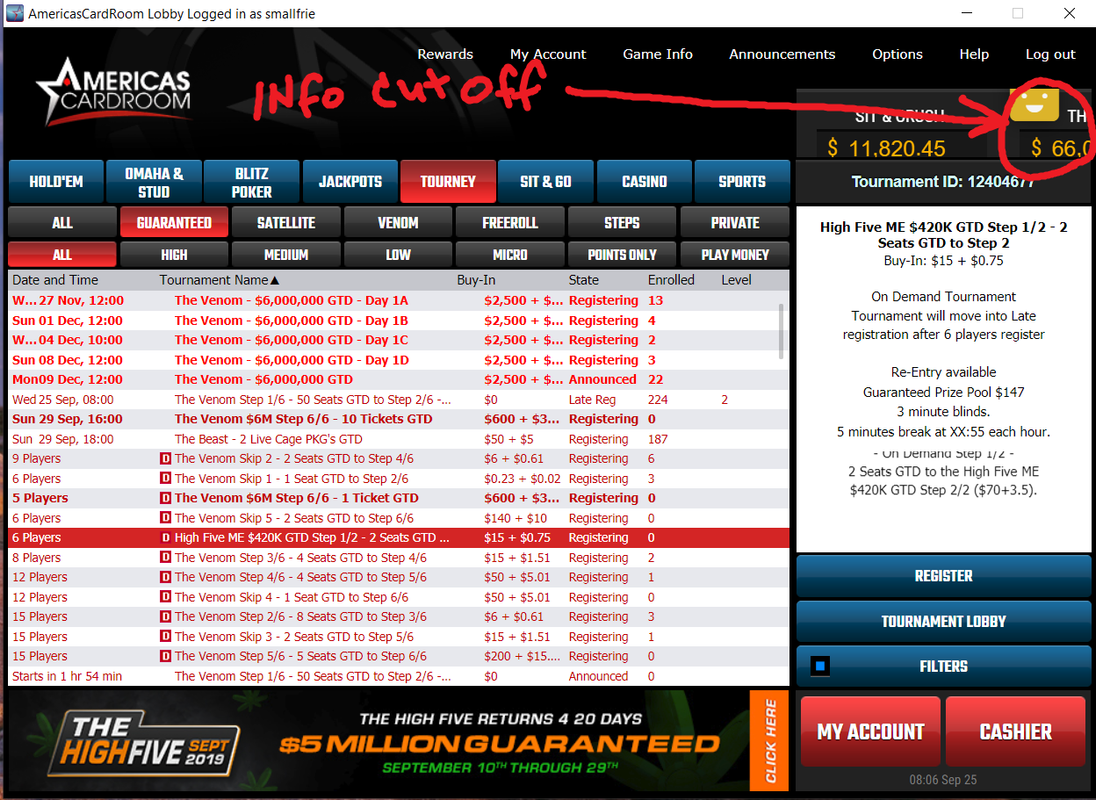
I like the morning update 9/25/2019. The lobby is way easier on the eyes. I see a problem on the right side with info cut off, but other than that I like it.

 
  • Like
Reactions: Shells
azforlife said:
ACR WHY IS THERE NO COPY/PASTE ALLOWED IN THE PASSWORD FIELD? PLEASE CHANGE IT ON UPCOMING UPDATE! I HATE TYPING UE9WH7NKHS 😀 THANKS
If you copy your password, then in the password box on ACR use Ctrl v... Press and hold Ctrl and v on your keyboard you will paste your copied password into the box. Right click paste does not work but Ctrl v paste does. I hope this helps you out.

Edit: I just saw CardsChat member jaymfc posted Ctrl v works for pasting a few lines up, but I will leave this here just in case someone missed his post.
 
Last edited:
  • Like
Reactions: tomk7788
Shells said:
Over the past several weeks, when logging into ACR I will get this...

87b0f70b6e27b502eeee15366ddb2590.png


First of all, I have never logged into ACR or any other skin of WPN on any other device, than the one I am currently working on. Secondly, I have yet to receive a 'verification email' after several attempts.

If I restart my computer (which we shouldn't need to do) then I can log into ACR successfully. Before anyone suggests to clear cookies, etc. I do daily maintenance.


This is more of a heads-up and PLEASE pass this on to your tech department.
ACR does this to me as well. I think this may be "Windows Update" causing this. I say this because I log into Coinbase and a couple other sites regularly that do the same thing (Tell me I am on a new device.) I noticed that every time Windows installs an update of any kind on my computer, the other sites seem to view it as a totally different device. It is pretty annoying.
 
smallfrie said:
I like the morning update 9/25/2019. The lobby is way easier on the eyes. I see a problem on the right side with info cut off, but other than that I like it.


I definitely second this one!!

Now, the lobby is much clearer. 🙂
 
  • Like
Reactions: lilpotato
Shells said:
I definitely second this one!!

Now, the lobby is much clearer. 🙂
Yes, and they already fixed the part that I circled that was cut off.
 
  • Like
Reactions: ACR Rep
smallfrie said:
Yes, and they already fixed the part that I circled that was cut off.

Is there a link that shows the changes?
 
tomk7788 said:
Is there a link that shows the changes?
ACR Rep can probably answer that. Changes I have mentioned are from personal observation only. 🙂
 
Status
Not open for further replies.
Back
Top