ACR Thread

  • Thread starter Thread starter ACR Rep
  • Start date Start date
Status
Not open for further replies.
snitcheroo said:
I wish there was a way to report abusive, nasty, ignorant racist people from the table with a click of a button. The chat doesn't stay very long and there is noway to scroll up because it disappears.


Thanks for your suggestions, I will send it directly to the development team, as of now, you can take a screen capture of the chat and send it by email as a report to CS reps to [email protected], that way they can take appropriate actions.
 
First, it is not Java. It is Javascript that is throwing the error.

AFAIK, the ACR client is not a Java program. Asking a person to update to the latest version of Java is irresponsible.

@flatterhay My advice is to uninstall the software from your system and re-install.If you have more problems, please report back.
flattershay said:
Hello, ACR Rep. Recently, I can't login to the client. Same thing shows up on my screen over and over again even if I click "Yes".
First this(pic1)
Loading screen(pic2)
and connection error(pic3) even though my internet is working just fine.
Any ways to fix it?

snitcheroo said:
This happened to me and I updated java , now no problems.

flattershay said:
I did it too but it didn't worked. Which version of Java you installed?

ACR Rep said:
Hi, please be sure you have the latest Java version and it should work 🙂
 
skaterick said:
I cant figure out when , or why the note taking function sometimes works but usually doesn't . I normally take them constantly , but its so frustrating because they so seldom stick . Even in the same MTT they disappear when you run into the same player later . Any idea when the notes software will start functioning properly on WPN ?

skaterick said:
it was really annoying when the site updated its software and I lost 5 years worth of notes+ color codes .there are also so many other glitches now that it would be hard to list them ! the new notes software is unpredictable , and it's barely worth the time . I would say less than 1 or 5 notes I take on opponents actually 'stick' till the next session . I gave up all real money MTT, sng + cash ring games due to this issue . I just play freerolls now , and I an ready to quit WPN entirely. Its a shame , since US players have so few other options .


Hi, I am really sorry you were affected by this known issue. Developers are working hard to get it fixed pretty soon.
 
Shady Slim said:
First, it is not Java. It is Javascript that is throwing the error.

AFAIK, the ACR client is not a Java program. Asking a person to update to the latest version of Java is irresponsible.

@flatterhay My advice is to uninstall the software from your system and re-install.If you have more problems, please report back.
Excuse me for not putting the rest of javascript in it. I uninstalled mine and reinstalled it and it did nt work. I was simply saying what worked for me. Don't be so rude!
 
snitcheroo said:
Excuse me for not putting the rest of javascript in it. I uninstalled mine and reinstalled it and it did nt work. I was simply saying what worked for me. Don't be so rude!

You don't install javascript. It is native to a browser. I wasn't being rude.

The fact is that you mislead a person into upgrading Java. So did the ACR Rep.

You said
This happened to me and I updated java , now no problems.


I was just correcting a misconception.

If you think that is rude, then get over it. The original poster should know the difference and not be led down a useless path.

Whatever you uninstalled/reinstalled was not related to Javascript or Java.
 
Last edited:
Shady Slim said:
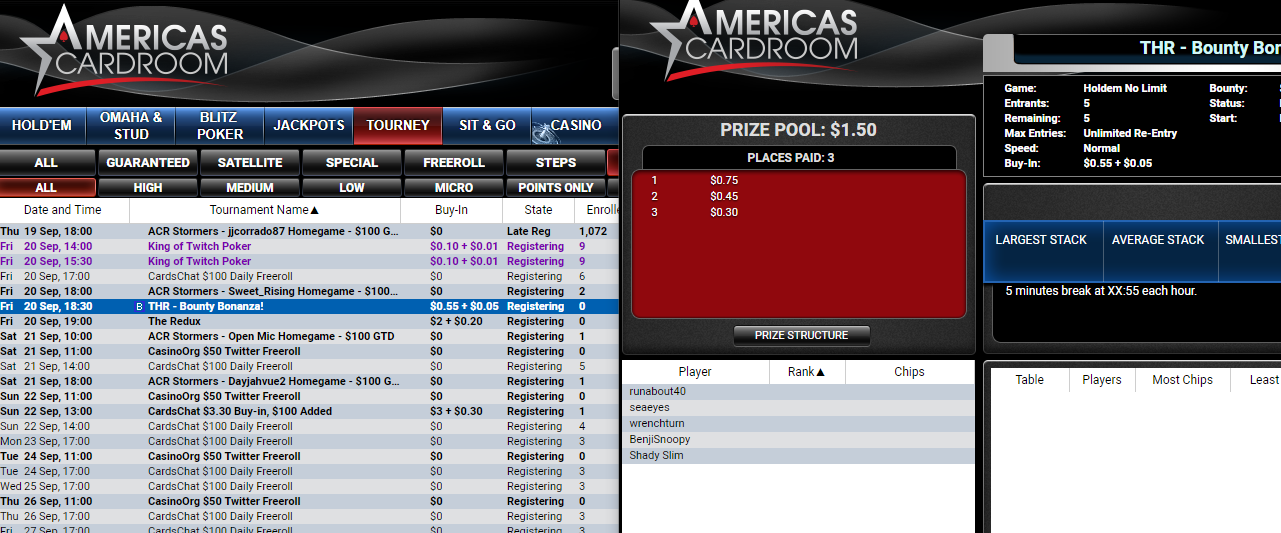
Not a display issue. I have seen delays in the reporting of totals for players, round, etc which is expected. This is different, the time is always off.

ACR Rep said:
Hi, this could be a display issue, the tournament, in fact, will start in about 2 hours 40 minutes, appreciate your feedback, I already report this to the department in charge. Wish you the best of luck at the tables 😎

Actually, the "Enrolled" totals in the lobby are not updating fast enough. I have been looking at that column for a few minutes.

After enrolling in a tournament, it still does not adjust that total.

EDIT: I will follow up on this to see if the GTD games do the same thing. If they are under-reported, will let you know.

In the screenshot below, there are clearly 5 enrolled but the lobby shows 0.

d470287b4736b443a257a5836dea23d2.png
 
Last edited:
Shady Slim said:
First, it is not Java. It is Javascript that is throwing the error.

AFAIK, the ACR client is not a Java program. Asking a person to update to the latest version of Java is irresponsible.

@flatterhay My advice is to uninstall the software from your system and re-install.If you have more problems, please report back.
Tried to re-install it to different disks(C,D), deleted all ACR files on %localappdata% and %appdata%, updated Microsoft Visual C++ and Java but none of those helped. Maybe it is because of the client version? Right now, it is ACR version 1.17.45. Btw, is americascardroom.com exists? Because it's redirecting me to the EU site even if I type the URL manually. Maybe I need to download it from COM site or find the older versions of the client.
 
flattershay said:
Tried to re-install it to different disks(C,D), deleted all ACR files on %localappdata% and %appdata%, updated Microsoft Visual C++ and Java but none of those helped. Maybe it is because of the client version? Right now, it is ACR version 1.17.45. Btw, is americascardroom.com exists? Because it's redirecting me to the EU site even if I type the URL manually. Maybe I need to download it from COM site or find the older versions of the client.

The most recent ACR Client Version 1.20.60
 
Just one question .. If I make a deposit through my visa card, can I withdraw money in the same way? I live in Austria and do not use cryptocurrencies.
 
tomk7788 said:
The most recent ACR Client Version 1.20.60

According to the client version under the help tab in the ACR Lobby.
 
flattershay said:
Tried to re-install it to different disks(C,D), deleted all ACR files on %localappdata% and %appdata%, updated Microsoft Visual C++ and Java but none of those helped. Maybe it is because of the client version? Right now, it is ACR version 1.17.45. Btw, is americascardroom.com exists? Because it's redirecting me to the EU site even if I type the URL manually. Maybe I need to download it from COM site or find the older versions of the client.

They own both domains (.com & .eu) and forward to the eu site. This is standard practice. You are on the right site.
 
  • Like
Reactions: ACR Rep
tomk7788 said:
The most recent ACR Client Version 1.20.60
Where I can download the new version? Couldn't find the other versions on the EU site.
 
It was extremely buggy for me as well, I ended up reinstalling it before it worked for me. I didnt need to find it, the update happened automatically
 
  • Like
Reactions: ACR Rep
flattershay said:
Where I can download the new version? Couldn't find the other versions on the EU site.

I'm having some issues with the site and was going to delete and reload the client. I checked the download file and it shows v. 1.17.45. So that must be it even though the lobby tab shows v 1.20.60. Sorry I couldn't be of more help.

 
ACR WHY IS THERE NO COPY/PASTE ALLOWED IN THE PASSWORD FIELD? PLEASE CHANGE IT ON UPCOMING UPDATE! I HATE TYPING UE9WH7NKHS 😀 THANKS
 
flattershay said:
Tried to re-install it to different disks(C, D), deleted all ACR files on %localappdata% and %appdata%, updated Microsoft Visual C++ and Java but none of those helped. Maybe it is because of the client version? Right now, it is ACR version 1.17.45. Btw, is americascardroom.com exists? Because it's redirecting me to the EU site even if I type the URL manually. Maybe I need to download it from COM site or find the older versions of the client.
Hi, I am sorry you are still having issues downloading our App for Windows Computers or Laptops.

Here are the instruction we provide to our players:

1. Find your main directory in file explorer!
2. Find ACR/BCP folder
3. Rename it or delete it
4. Delete Americas Card Room / Black Chip Poker from your computer in Control Panel
5. Restart your computer
6. Download and install
7. Sign in and enjoy!

If you are having issues with ACR you may always try the BCP download installer.

https://www.blackchippoker.eu/downloading/

If after these instructions and different app installer you are still not able to properly log in and play, we highly recommend you to directly contact Americas Cardroom Support Staff, as they will gladly help you. Click on the “Support” tab at the top of our website to access our live chat feature or email [email protected] for 24/7 help.
 
vuk011 said:
Just one question .. If I make a deposit through my Visa card, can I withdraw money in the same way? I live in Austria and do not use cryptocurrencies.
Hi, we do not offer withdrawals to the credit/debit card. only the options showing in the cashier and at the withdraw section. For more details get in touch with Americas Cardroom Support Staff, as they will gladly help you.
 
Shells said:
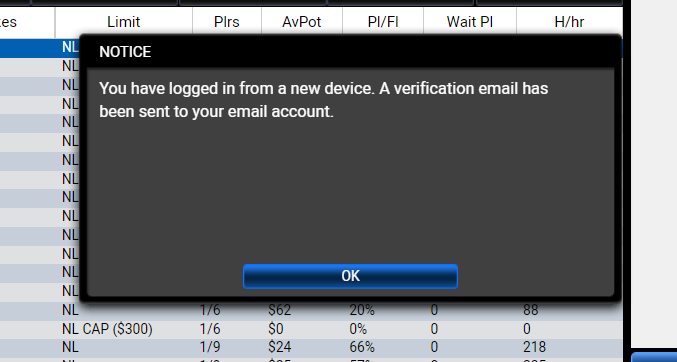
Over the past several weeks, when logging into ACR I will get this...

87b0f70b6e27b502eeee15366ddb2590.png


First of all, I have never logged into ACR or any other skin of WPN on any other device, than the one I am currently working on. Secondly, I have yet to receive a 'verification email' after several attempts.

If I restart my computer (which we shouldn't need to do) then I can log into ACR successfully. Before anyone suggests to clear cookies, etc. I do daily maintenance.


This is more of a heads-up and PLEASE pass this on to your tech department.
Hello dear Shells,

I am sorry you are having issues with our platform.

I contacted our Customer Service Supervisors team and did mention something about this being related to the device manager, and that there is a troubleshooting to make regarding the player's email platform.

Which only means that you should kindly contact our Customer Service Support Staff via Live Chat for further troubleshooting assistance.

Thanks a lot for your understanding in this matter, hope you continue to enjoy at our tables.

ACR Rep :icon_thum
 
  • Like
Reactions: Shells
Hello guys, I am thinking about buying a mac laptop, but I just want to make sure you can actually download it on BCP. Their site confuses me because on the frequently ask questions page, it says, we currently dont support mac, but on the download page, it says we got you covered whether you have windows or mac. So does BCP work on mac laptop or not? If not, I guess I will just buy a Dell then.
 
Shells said:
Over the past several weeks, when logging into ACR I will get this...

87b0f70b6e27b502eeee15366ddb2590.png


First of all, I have never logged into ACR or any other skin of WPN on any other device, than the one I am currently working on. Secondly, I have yet to receive a 'verification email' after several attempts.

If I restart my computer (which we shouldn't need to do) then I can log into ACR successfully. Before anyone suggests to clear cookies, etc. I do daily maintenance.


This is more of a heads-up and PLEASE pass this on to your tech department.

ACR Rep said:
Hello dear Shells,

I am sorry you are having issues with our platform.

I contacted our Customer Service Supervisors team and did mention something about this being related to the device manager, and that there is a troubleshooting to make regarding the player's email platform.

Which only means that you should kindly contact our Customer Service Support Staff via Live Chat for further troubleshooting assistance.

Thanks a lot for your understanding in this matter, hope you continue to enjoy at our tables.

ACR Rep :icon_thum
I know that message. Used to get it a LOT! In the end they told me on the phone that I had to request a change to my registered e-mail address to a gmail one. That was hard to do because they said their phones were down at the time and they have to phone you when you request an e-mail change. Took a long to time to fix. After many unanswered phone calls and many chats with support I finally got them to phone me to verify my new gmail e-mail, but then after that phone call they told me that the phone number that they called me at was invalid. Eventually I got them to phone me again at the same phone number to verify that the phone number that they were using was valid.

It's all good now.
 
Last edited:
  • Like
Reactions: ACR Rep
mountainfox said:
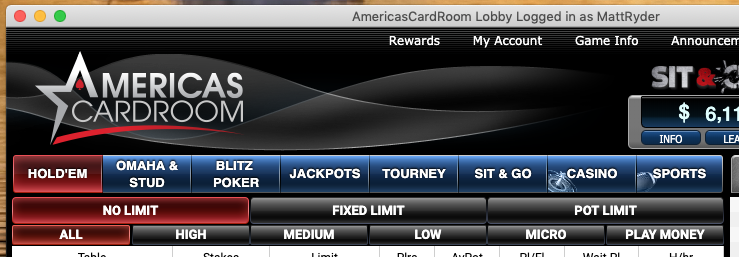
Hello guys, I am thinking about buying a mac laptop, but I just want to make sure you can actually download it on BCP. Their site confuses me because on the frequently ask questions page, it says, we currently dont support mac, but on the download page, it says we got you covered whether you have windows or mac. So does BCP work on mac laptop or not? If not, I guess I will just buy a Dell then.
ACR definitely downloads, installs and runs on a Mac:

88fdd1ac06f9b48ccc9f523f06eb37e1.png
 
  • Like
Reactions: ACR Rep
Shells said:
Over the past several weeks, when logging into ACR I will get this...

87b0f70b6e27b502eeee15366ddb2590.png


First of all, I have never logged into ACR or any other skin of WPN on any other device, than the one I am currently working on. Secondly, I have yet to receive a 'verification email' after several attempts.

If I restart my computer (which we shouldn't need to do) then I can log into ACR successfully. Before anyone suggests to clear cookies, etc. I do daily maintenance.


This is more of a heads-up and PLEASE pass this on to your tech department.

I downloaded BCP today and get same pop up, I am on a new device tho. I received an email with a code but it doesn't work, tried it a few times, what do you suggest I do^
 
Status
Not open for further replies.
Back
Top